<?xml version="1.0" encoding="utf-8"?>
<feed xmlns="http://www.w3.org/2005/Atom">
    <title>asciijungle.com</title>
    <link href="https://asciijungle.com/atom.xml" rel="self" />
    <link href="https://asciijungle.com" />
    <id>https://asciijungle.com/atom.xml</id>
    <author>
        <name>Benjamin Brunzel</name>
        
    </author>
    <updated>2026-03-02T00:00:00Z</updated>
    <entry>
    <title>Archiving Personal Photos Offline: A Complete M-Disk Workflow</title>
    <link href="https://asciijungle.com/posts/2026-03-02-archive-photos-mdisk-bluray.html" />
    <id>https://asciijungle.com/posts/2026-03-02-archive-photos-mdisk-bluray.html</id>
    <published>2026-03-02T00:00:00Z</published>
    <updated>2026-03-02T00:00:00Z</updated>
    <summary type="html"><![CDATA[<article>
    <header>
        <h1>Archiving Personal Photos Offline: A Complete M-Disk Workflow</h1>
        <section class="date">
            Posted on 2026-03-02
            
        </section>
        <section class="tldr">
            <div>TL;DR</div>
            <span>I've built a photo archive on M-Disk Blu-rays using open source command line tooling like par2, and SHA256 verification. Offline, redundant, and designed to last decades without cloud subscriptions.</span>
        </section>
    </header>
    <section>
        <p>Everyone has personal data that is worth archiving. Data that does not change, that is not accessed all the time but data that you want to access in the future.
There are different solutions to this problem. Here I’ll show you how I archive my photo collection.</p>
<p>Over the years I have collected quite a number of personal photos. I wanted a way to store them safely to have them available for many years to come. Most people use a photo service that promises to store pictures for a monthly fee in their cloud. At first their prices are quite appealing but over the time as you use more and more storage and as you have to pay each month it becomes more and more unattractive. That is the reason I want to store the data on physical media in my control.</p>
<h2 id="physical-storage-options">Physical Storage Options</h2>
<p>There are different options for storing larger amounts of Data on physical media. For me it is important to store the data for a long time without having to copy it, refresh it or renew the physical media every now and then. I want the data to be stored offline, that means I do not want to use for example an network attached storage device that has to be plugged in.
The last criterion of importance to me was a format that has sufficient relevance, so there is a high likelihood that devices capable of reading it will be available in the future.</p>
<h2 id="m-disk-standard">M-Disk Standard</h2>
<p>For now I went with <a href="https://en.wikipedia.org/wiki/M-DISC">M-Disk</a>. That is a disk technology compatible with the DVD or Blu-ray standard. They use a glassy carbon material instead of the organic material that is commonly used in DVDs and Blu-rays. That’s why they claim they have a longer lifetime of several hundred years. Of course there is no way to find out how long they live since they only have been around for a few years by now. However there have been several tests by different entities that suggest a longer lifetime than regular blu-rays.</p>
<p>M-Disks exist in different storage sizes: DVD with 4,7 GB, Blu-ray with 25 GB and Blu-ray XL with up to 128 GB of storage. Depending on the amount of data to archive that may be a lot of disks. I went with the regular Blu-ray ones since it appears to be a good tradeoff between large enough storage and a widespread format that can be read by a lot of drives.
For the drives I won’t be recommending any devices. I’ve got an external USB Blu-ray writer that is capable of writing M-Disks.</p>
<h2 id="a-thought-about-encryption">A Thought about Encryption</h2>
<p>The content on a disc could be encrypted using different methods. I thought about this but decided against it. My personal photo collection is insensitive enough to be readable by anyone who can get their hands on the disks. Access Keys also need to be securely stored in a way that is different than the disks. If the keys are lost there is no way to restore the archive. That’s why for now I decided against encrypting the data on my disks.</p>
<h2 id="what-is-on-a-disk">What is on a Disk</h2>
<p>My disks currently follow a straight forward folder structure.</p>
<div class="sourceCode" id="cb1"><pre class="sourceCode txt"><code class="sourceCode default"><span id="cb1-1"><a href="#cb1-1" aria-hidden="true" tabindex="-1"></a>2026_PHOTOS_2022_0812</span>
<span id="cb1-2"><a href="#cb1-2" aria-hidden="true" tabindex="-1"></a>   ├── README.md</span>
<span id="cb1-3"><a href="#cb1-3" aria-hidden="true" tabindex="-1"></a>   ├── VERIFICATION.md</span>
<span id="cb1-4"><a href="#cb1-4" aria-hidden="true" tabindex="-1"></a>   ├── manifest.sha256</span>
<span id="cb1-5"><a href="#cb1-5" aria-hidden="true" tabindex="-1"></a>   ├── redundancy/</span>
<span id="cb1-6"><a href="#cb1-6" aria-hidden="true" tabindex="-1"></a>   └── CONTENT/</span></code></pre></div>
<p>The readme file contains information about the disk. This is primarily for myself if I’m accessing one of the discs in the future. Each disk gets a disk id that I assign to it which also goes into the readme. Here is an example of a readme file in one of my discs:</p>
<div class="sourceCode" id="cb2"><pre class="sourceCode markdown"><code class="sourceCode markdown"><span id="cb2-1"><a href="#cb2-1" aria-hidden="true" tabindex="-1"></a><span class="fu"># Archive Disk</span></span>
<span id="cb2-2"><a href="#cb2-2" aria-hidden="true" tabindex="-1"></a>Disc ID: 2026_PHOTOS_2022_0812</span>
<span id="cb2-3"><a href="#cb2-3" aria-hidden="true" tabindex="-1"></a></span>
<span id="cb2-4"><a href="#cb2-4" aria-hidden="true" tabindex="-1"></a>This data belongs to Benjamin Brunzel</span>
<span id="cb2-5"><a href="#cb2-5" aria-hidden="true" tabindex="-1"></a>E-Mail: b***@***.de</span>
<span id="cb2-6"><a href="#cb2-6" aria-hidden="true" tabindex="-1"></a>*Address goes here*</span>
<span id="cb2-7"><a href="#cb2-7" aria-hidden="true" tabindex="-1"></a></span>
<span id="cb2-8"><a href="#cb2-8" aria-hidden="true" tabindex="-1"></a><span class="fu">## Metadata</span></span>
<span id="cb2-9"><a href="#cb2-9" aria-hidden="true" tabindex="-1"></a>Created: 2026-01-09</span>
<span id="cb2-10"><a href="#cb2-10" aria-hidden="true" tabindex="-1"></a>Category: Photos</span>
<span id="cb2-11"><a href="#cb2-11" aria-hidden="true" tabindex="-1"></a>Content:</span>
<span id="cb2-12"><a href="#cb2-12" aria-hidden="true" tabindex="-1"></a><span class="ss"> - </span>Photos from 2022 August to December</span>
<span id="cb2-13"><a href="#cb2-13" aria-hidden="true" tabindex="-1"></a><span class="ss"> - </span>Includes hamburg, radtour</span>
<span id="cb2-14"><a href="#cb2-14" aria-hidden="true" tabindex="-1"></a>Size: 20GB</span>
<span id="cb2-15"><a href="#cb2-15" aria-hidden="true" tabindex="-1"></a></span>
<span id="cb2-16"><a href="#cb2-16" aria-hidden="true" tabindex="-1"></a><span class="fu">## Privacy / Usage Notice</span></span>
<span id="cb2-17"><a href="#cb2-17" aria-hidden="true" tabindex="-1"></a>These data contain personal and private content (photos, videos, documents).</span>
<span id="cb2-18"><a href="#cb2-18" aria-hidden="true" tabindex="-1"></a>They are intended for personal use only.</span>
<span id="cb2-19"><a href="#cb2-19" aria-hidden="true" tabindex="-1"></a></span>
<span id="cb2-20"><a href="#cb2-20" aria-hidden="true" tabindex="-1"></a>**It is strictly prohibited to copy, distribute, publish, or otherwise use the data without the explicit permission of the owners.**</span></code></pre></div>
<p>The verification file describes the verification process that can be used to check the integrity of the disk. This process will be described later.</p>
<p>The manifest file contains sha256 checksums for every file in the <code>CONTENT</code> folder. They allow for checking if a file can be correctly read from the archive. This is checked during verification.</p>
<p>The redundancy folder contains redundant parity data per top level folder in <code>CONTENT</code> This allows to reconstruct the data in case of losing data within the archive due to unreadable sectors. In my configuration I use 15% of redundancy. This means I can recover from up to 15% lost sectors. So if a disk only has 86% of readable sectors I’m theoretically able to restore the files without errors.</p>
<h2 id="creating-a-disk">Creating a Disk</h2>
<p>To create a disk I’m selecting which data goes onto it. I copy it to a directory on my linux machine that I want to use to burn the data to the disk. In that directory I create the target file structure as it should be found on the resulting disk. I have to make sure not to exceed 20GB of file size in <code>CONTENT</code> because I will add the 15% of redundancy that has to be accounted for.</p>
<p>After I’m fine with the contents that should go on my disk I create the sha256 checksums with the following command on the shell:</p>
<div class="sourceCode" id="cb3"><pre class="sourceCode bash"><code class="sourceCode bash"><span id="cb3-1"><a href="#cb3-1" aria-hidden="true" tabindex="-1"></a><span class="fu">find</span> ./CONTENT <span class="at">-type</span> f <span class="at">-print0</span> <span class="kw">|</span> <span class="fu">sort</span> <span class="at">-z</span> <span class="kw">|</span> <span class="fu">xargs</span> <span class="at">-0</span> sha256sum <span class="op">&gt;</span> manifest.sha256</span></code></pre></div>
<p>Next, I’m generating the redundancy using the <code>par2</code> program and move those files into the redundancy directory. It will generate multiple files for each folder in the top level of the <code>CONTENT</code> directory.</p>
<div class="sourceCode" id="cb4"><pre class="sourceCode bash"><code class="sourceCode bash"><span id="cb4-1"><a href="#cb4-1" aria-hidden="true" tabindex="-1"></a><span class="fu">mkdir</span> redundancy</span>
<span id="cb4-2"><a href="#cb4-2" aria-hidden="true" tabindex="-1"></a></span>
<span id="cb4-3"><a href="#cb4-3" aria-hidden="true" tabindex="-1"></a><span class="cf">for</span> dir <span class="kw">in</span> CONTENT/<span class="pp">*</span>/<span class="kw">;</span> <span class="cf">do</span></span>
<span id="cb4-4"><a href="#cb4-4" aria-hidden="true" tabindex="-1"></a>  <span class="cf">if</span> <span class="bu">[</span> <span class="ot">-d</span> <span class="st">&quot;</span><span class="va">$dir</span><span class="st">&quot;</span> <span class="bu">]</span><span class="kw">;</span> <span class="cf">then</span></span>
<span id="cb4-5"><a href="#cb4-5" aria-hidden="true" tabindex="-1"></a>    <span class="ex">par2</span> create <span class="at">-r15</span> <span class="at">-s4194304</span> <span class="st">&quot;</span><span class="va">$(</span><span class="fu">basename</span> <span class="st">&quot;</span><span class="va">$dir</span><span class="st">&quot;</span><span class="va">)</span><span class="st">.par2&quot;</span> <span class="va">$(</span><span class="fu">find</span> <span class="st">&quot;</span><span class="va">$dir</span><span class="st">&quot;</span> <span class="at">-type</span> f<span class="va">)</span></span>
<span id="cb4-6"><a href="#cb4-6" aria-hidden="true" tabindex="-1"></a>  <span class="cf">fi</span></span>
<span id="cb4-7"><a href="#cb4-7" aria-hidden="true" tabindex="-1"></a><span class="cf">done</span></span>
<span id="cb4-8"><a href="#cb4-8" aria-hidden="true" tabindex="-1"></a></span>
<span id="cb4-9"><a href="#cb4-9" aria-hidden="true" tabindex="-1"></a><span class="fu">mv</span> <span class="pp">*</span>.par2 redundancy</span></code></pre></div>
<p>Now the directory is ready to generate the universal disk format file system image that can be used to burn the resulting disk. We use this command:</p>
<div class="sourceCode" id="cb5"><pre class="sourceCode bash"><code class="sourceCode bash"><span id="cb5-1"><a href="#cb5-1" aria-hidden="true" tabindex="-1"></a><span class="ex">mkisofs</span> <span class="at">-udf</span> <span class="at">-r</span> <span class="at">-V</span> 2026_PHOTOS_2022_0812 <span class="at">-o</span> ../2026_PHOTOS_2022_0812.iso .</span></code></pre></div>
<p>You should check the filesize of the resulting iso file. It must not exceed 25 GB to fit onto a blu-ray.
Finally, I write the image onto a M-Disk using the <code>growisofs</code> command. Make sure you have your drive attached and an empty disk inserted. We will limit the writing speed to 4x which is reported to work better when writing M-Disk.</p>
<div class="sourceCode" id="cb6"><pre class="sourceCode bash"><code class="sourceCode bash"><span id="cb6-1"><a href="#cb6-1" aria-hidden="true" tabindex="-1"></a><span class="ex">growisofs</span> <span class="at">-dvd-compat</span> <span class="at">-speed</span><span class="op">=</span>4 <span class="at">-Z</span> /dev/sr0=2026_PHOTOS_2022_0812.iso</span></code></pre></div>
<p>Once this succeeds the data has been written to the disk. Now it’s time to verify the integrity of the disk we just created.</p>
<h2 id="verification-of-a-disk">Verification of a Disk</h2>
<p>This procedure will be conducted directly after creation of a new disk to make sure that the data on it can be relied on. After that it is recommended to verify stored disks every so often to ensure data remains to be readable. If you experience unreadable sectors you should still be able to restore all the data using the par2 parity data.</p>
<p>There are multiple steps to verification. First we’ll read all sectors of the disk printing an error in case there are any broken sectors.</p>
<div class="sourceCode" id="cb7"><pre class="sourceCode bash"><code class="sourceCode bash"><span id="cb7-1"><a href="#cb7-1" aria-hidden="true" tabindex="-1"></a><span class="fu">dd</span> if=/dev/sr0 of=/dev/null bs=2048 conv=noerror,sync status=progress</span></code></pre></div>
<p>In case of an error it would look like this: <code>dd: error reading '/dev/sr0': Input/output error</code>
Note that we are using the block size of 2048 as this is the standard block size for optical media.</p>
<p>If that command runs without any issues we continue with checking the checksums from the manifest file we’ve created earlier.</p>
<div class="sourceCode" id="cb8"><pre class="sourceCode bash"><code class="sourceCode bash"><span id="cb8-1"><a href="#cb8-1" aria-hidden="true" tabindex="-1"></a><span class="fu">sudo</span> mount /dev/sr0 /mnt</span>
<span id="cb8-2"><a href="#cb8-2" aria-hidden="true" tabindex="-1"></a><span class="bu">cd</span> /mnt</span>
<span id="cb8-3"><a href="#cb8-3" aria-hidden="true" tabindex="-1"></a><span class="fu">sha256sum</span> <span class="at">-c</span> manifest.sha256 <span class="dv">2</span><span class="op">&gt;&amp;</span><span class="dv">1</span> <span class="kw">|</span> <span class="fu">grep</span> <span class="at">-v</span> <span class="st">': OK$'</span></span></code></pre></div>
<p>This command checks all the files for their checksum in the manifest file. Only files that are not OK will be printed. If there is no output from this command everything is fine and the verification was successful. This process should be done every few years. I write down the verification result with date in the booklet of the disks enclosure. I’ve created over twenty disks by now and so far none of them had any issues during creation and verification.</p>
<h2 id="storage-of-the-disks">Storage of the Disks</h2>
<p>The Disks should be stored in a dark and dry environment in vertical orientation. I write each iso twice and store the disks in two different locations.</p>
<p>Let’s see how long this archive will hold up for me. So far all disks were without any errors. It is worth noting that writing disks and also the verification takes quite some time. If you have a lot of disks this becomes unbearable. Probably it would be an option to look into Blu-ray XL disks for larger data sets. For my personal archive I’ve not had any issue yet.</p>
<p>Are you archiving data? What is your approach? I’d like to hear about it.</p>
    </section>
    <section class="author">
        <div class="image-container">
            <img src="https://asciijungle.com/images/author.jpg" alt="Portrait of the blog's author. Dude with full beard and short hair.">
        </div>
        <div class="about">
            <span><b>Author: Benjamin Brunzel</b></span>
            <span>I'm a software engineer based in Hamburg, Germany.</span>
            <span>If you want to get in touch <a href="https://norden.social/@asciijungle"> contact me in the fediverse</a></span>
        </div>
    </section>
    
</article>
]]></summary>
</entry>
<entry>
    <title>Building a LibreWolf Browser Setup with reasonable privacy and Vim Keybindings</title>
    <link href="https://asciijungle.com/posts/2026-02-19-browser-setup.html" />
    <id>https://asciijungle.com/posts/2026-02-19-browser-setup.html</id>
    <published>2026-02-19T00:00:00Z</published>
    <updated>2026-02-19T00:00:00Z</updated>
    <summary type="html"><![CDATA[<article>
    <header>
        <h1>Building a LibreWolf Browser Setup with reasonable privacy and Vim Keybindings</h1>
        <section class="date">
            Posted on 2026-02-19
            
        </section>
        <section class="tldr">
            <div>TL;DR</div>
            <span>A guide to setting up LibreWolf browser with Tridactyl vim keybindings and custom CSS for a privacy-focused, keyboard-driven browsing experience that maximizes screen space for content.</span>
        </section>
    </header>
    <section>
        <p>The web browser is one of the most important programs in my day-to-day work on the computer.
I want a browser setup that addresses a couple of goals. First I’d like to be independent of large corporations that try to observe my browsing behaviour for their profit. That is why I’d rather use an open source implementation instead of the various chrome based browsers. Since the servo browser<a href="#fn1" class="footnote-ref" id="fnref1" role="doc-noteref"><sup>1</sup></a> is not there yet<a href="#fn2" class="footnote-ref" id="fnref2" role="doc-noteref"><sup>2</sup></a>, a mozilla firefox based browser is the most viable option as of today.
Because Mozilla has started to put more and more questionable features into the firefox main release line, I was looking to try one of the open source forks promising more privacy. I need a reasonable tradeoff between privacy and ease of use. That is why I didn’t went with the tor browser providing the best privacy of the alternatives I looked at. I settled with the <a href="https://librewolf.net/">LibreWolf browser</a>.</p>
<p>The tiling window manager on my linux distribution can be completely managed from the keyboard without having to use the mouse. That is why I’d like to have improved keybindings for my browser as well. Since I’m using vim bindings for many of my other programs as well a vi plugin serves me very well in this regard. I added the <a href="https://addons.mozilla.org/en-US/firefox/addon/tridactyl-vim/">firefox extension Tridactyl</a> to LibreWolf.</p>
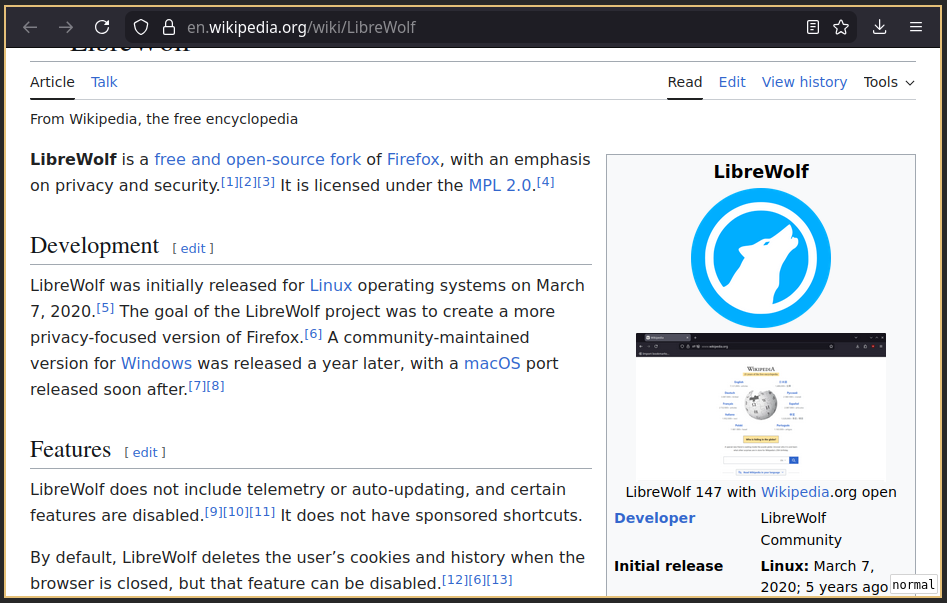
<p>Finally I also wanted to do some changes to the UI of the browser so the space used for the actual content of a webpage is maximized and it is not displaying active UI elements that I do not use.</p>
<figure id="fig:screenshot">
<img src="https://asciijungle.com/images/libreWolf-screnshot.png" />
<figcaption>Screenshot of my LibreWolf setup only showing a thin Adressbar on the top and no tablist or bookmark bar.</figcaption>
</figure>
<p>The result is a quite clean web browsing experience as can be seen on the screenshot above. It works nicely on large screens as well as smaller tiled areas as can be seen in the example.</p>
<h2 id="how-to-set-this-up">How to set this up</h2>
<p>I’m describing how to install the setup here so I can remember when moving to a different installation.
First you have to install the LibreWolf browser on your linux machine. The complete setup should in my eyes also work on MacOS or even Windows machines even though I have never tested it myself. The LibreWolf website describes the <a href="https://librewolf.net/installation/">installation for the various operating systems</a>.</p>
<p>After that you have to install the Tridactyl browser extension through the extension management in <code>about:addons</code>. Open that page in your browser, search for the plugin and apply it.
Once that is done I have opted for the default dark theme. This can be selected in <code>about:preferences</code>.
Next I wanted to hide the huge tab bar on the top of the browser. Tridactyle offers a tab list by pressing <code>b</code>, but I found that I do not use nearly as many open tabs at a time now that I use this extension<a href="#fn3" class="footnote-ref" id="fnref3" role="doc-noteref"><sup>3</sup></a>. This can be achieved by using a userChrome.css file<a href="#fn4" class="footnote-ref" id="fnref4" role="doc-noteref"><sup>4</sup></a>.
That file has to go into your browser profile directory which is located in your home config directory.</p>
<div class="sourceCode" id="cb1"><pre class="sourceCode css"><code class="sourceCode css"><span id="cb1-1"><a href="#cb1-1" aria-hidden="true" tabindex="-1"></a><span class="co">/* asciijungles's userChrome.css</span></span>
<span id="cb1-2"><a href="#cb1-2" aria-hidden="true" tabindex="-1"></a><span class="co"> * write to ~/.config/librewolf/librewolf/{yourProfile}/chrome/userChrome.css</span></span>
<span id="cb1-3"><a href="#cb1-3" aria-hidden="true" tabindex="-1"></a><span class="co"> */</span></span>
<span id="cb1-4"><a href="#cb1-4" aria-hidden="true" tabindex="-1"></a></span>
<span id="cb1-5"><a href="#cb1-5" aria-hidden="true" tabindex="-1"></a><span class="co">/* hide header tab bar */</span></span>
<span id="cb1-6"><a href="#cb1-6" aria-hidden="true" tabindex="-1"></a><span class="pp">#TabsToolbar</span> {</span>
<span id="cb1-7"><a href="#cb1-7" aria-hidden="true" tabindex="-1"></a>    <span class="kw">visibility</span><span class="ch">:</span> <span class="dv">collapse</span> <span class="at">!important</span><span class="op">;</span></span>
<span id="cb1-8"><a href="#cb1-8" aria-hidden="true" tabindex="-1"></a>}</span>
<span id="cb1-9"><a href="#cb1-9" aria-hidden="true" tabindex="-1"></a><span class="co">/* hide huge sidebar header*/</span></span>
<span id="cb1-10"><a href="#cb1-10" aria-hidden="true" tabindex="-1"></a><span class="pp">#sidebar-header</span><span class="op">,</span> <span class="pp">#search-box</span> {</span>
<span id="cb1-11"><a href="#cb1-11" aria-hidden="true" tabindex="-1"></a>    <span class="kw">display</span><span class="ch">:</span> <span class="dv">none</span><span class="at">!important</span><span class="op">;</span></span>
<span id="cb1-12"><a href="#cb1-12" aria-hidden="true" tabindex="-1"></a>}</span>
<span id="cb1-13"><a href="#cb1-13" aria-hidden="true" tabindex="-1"></a><span class="pp">#sidebar-header</span> {</span>
<span id="cb1-14"><a href="#cb1-14" aria-hidden="true" tabindex="-1"></a>    <span class="kw">display</span><span class="ch">:</span> <span class="dv">none</span> <span class="at">!important</span><span class="op">;</span></span>
<span id="cb1-15"><a href="#cb1-15" aria-hidden="true" tabindex="-1"></a>}</span>
<span id="cb1-16"><a href="#cb1-16" aria-hidden="true" tabindex="-1"></a></span>
<span id="cb1-17"><a href="#cb1-17" aria-hidden="true" tabindex="-1"></a><span class="co">/* minimize sidebar splitter */</span></span>
<span id="cb1-18"><a href="#cb1-18" aria-hidden="true" tabindex="-1"></a><span class="pp">#sidebar-splitter</span> {</span>
<span id="cb1-19"><a href="#cb1-19" aria-hidden="true" tabindex="-1"></a>    <span class="kw">background-color</span><span class="ch">:</span> <span class="cn">black</span><span class="at">!important</span><span class="op">;</span></span>
<span id="cb1-20"><a href="#cb1-20" aria-hidden="true" tabindex="-1"></a>    <span class="kw">width</span><span class="ch">:</span> <span class="dv">1</span><span class="dt">px</span><span class="at">!important</span><span class="op">;</span></span>
<span id="cb1-21"><a href="#cb1-21" aria-hidden="true" tabindex="-1"></a>    <span class="kw">border</span><span class="ch">:</span> <span class="dv">0</span><span class="dt">px</span><span class="at">!important</span><span class="op">;</span></span>
<span id="cb1-22"><a href="#cb1-22" aria-hidden="true" tabindex="-1"></a>}</span></code></pre></div>
<p>After that you have to enable usage of the userChrome file in <code>about:config</code>. On that page you are able to set values for configuration properties. Serch for the following config and toggle its value to be <code>true</code>.</p>
<div class="sourceCode" id="cb2"><pre class="sourceCode bash"><code class="sourceCode bash"><span id="cb2-1"><a href="#cb2-1" aria-hidden="true" tabindex="-1"></a><span class="ex">toolkit.legacyUserProfileCustomizations.stylesheets</span> = true</span></code></pre></div>
<p>The changes apply after a restart of the program.</p>
<p>Last quick thing: I like to cycle through the open tabs with Ctrl + Tab. I use the setting “Activate Ctrl+Tab cycles through tabs in recently used order” that can be set in <code>about:preferences</code>. That way I can always jump back to the previous tab instead of tabbing through the whole list. Try it, it’s nice.</p>
<p>That is all you have to do to clone my setup. Enjoy.</p>
<h2 id="what-i-wish-for">What I wish for</h2>
<p>I’m very happy with the setup as is at the moment. But there is one thing that I would really love to have. The browser supports multiple profiles with separate histories and shared sessions between tabs. In order to change profiles you have to start a different instance of the browser program.
At work I have different profiles for different customers I work for and can be logged in to several web applications using <a href="https://en.wikipedia.org/wiki/OpenID#OpenID_Connect_(OIDC)">OpenID Connect</a>. I have to run two browsers and switch between them on different workspaces.
It works but, I think it would be awesome to be able to use different profiles per tab in the same session. I imagine to be able to have a keybinding “open in profile 2” that opens in a profile other than my default.</p>
<p>What do you think? How are you using your browser?
I’d love to hear about it. Please <a href="https://norden.social/@asciijungle">get in touch with me on the fediverse</a>.</p>
<h2 id="footnotes">Footnotes</h2>
<section id="footnotes" class="footnotes footnotes-end-of-document" role="doc-endnotes">
<hr />
<ol>
<li id="fn1"><p>Servo is an independent browser engine implementation written in Rust: <a href="https://servo.org/">https://servo.org/</a>.<a href="#fnref1" class="footnote-back" role="doc-backlink">↩︎</a></p></li>
<li id="fn2"><p>Even though there has been a significant <a href="https://servo.org/wpt/">improvements in the recent years</a>, the Servo Browser Engine is <a href="https://arewebrowseryet.com/metrics/css/">not quite usable as a daily driver</a>.<a href="#fnref2" class="footnote-back" role="doc-backlink">↩︎</a></p></li>
<li id="fn3"><p>Others seem to have experienced the same. For example <a href="https://dev.to/kwstannard/tridactyl-and-the-death-of-tabs-14gj">KW Stannard has blogged about this on dev.to</a>.<a href="#fnref3" class="footnote-back" role="doc-backlink">↩︎</a></p></li>
<li id="fn4"><p>You can actually change a lot of the firefox UI with a local css file which is pretty awesome! check out: <a href="https://www.userchrome.org/what-is-userchrome-css.html">https://www.userchrome.org/what-is-userchrome-css.html</a><a href="#fnref4" class="footnote-back" role="doc-backlink">↩︎</a></p></li>
</ol>
</section>
    </section>
    <section class="author">
        <div class="image-container">
            <img src="https://asciijungle.com/images/author.jpg" alt="Portrait of the blog's author. Dude with full beard and short hair.">
        </div>
        <div class="about">
            <span><b>Author: Benjamin Brunzel</b></span>
            <span>I'm a software engineer based in Hamburg, Germany.</span>
            <span>If you want to get in touch <a href="https://norden.social/@asciijungle"> contact me in the fediverse</a></span>
        </div>
    </section>
    
</article>
]]></summary>
</entry>
<entry>
    <title>39C3: My Major Topics of the Chaos Communication Congress</title>
    <link href="https://asciijungle.com/posts/2026-01-14-39C3-my-main-topics.html" />
    <id>https://asciijungle.com/posts/2026-01-14-39C3-my-main-topics.html</id>
    <published>2026-01-14T00:00:00Z</published>
    <updated>2026-01-14T00:00:00Z</updated>
    <summary type="html"><![CDATA[<article>
    <header>
        <h1>39C3: My Major Topics of the Chaos Communication Congress</h1>
        <section class="date">
            Posted on 2026-01-14
            
        </section>
        <section class="tldr">
            <div>TL;DR</div>
            <span>Key discussion points of the 39C3 congress from my point of view as an attendee were Digital suvereignity, Gen- and Agentic AI, as well as Hardware Security. Here I'll explain why and suggest talk recordings.</span>
        </section>
    </header>
    <section>
        <p>The CCC’s Chaos Communication Congress of is an event I’m always looking forward to. It’s the annual conference of the German and international sub culture around computers and the culture surrounding it. I’ve attended all four days and want to share my key takeaways as well as what I observed to be the major topics of 2025</p>
<h2 id="digital-sovereignty">Digital sovereignty</h2>
<p>The global political balance is shifting. Not just in the United States, populist movements are gaining traction. Relying on big tech vendors and trusting them with our data and using their infrastructure for critical communication has become a liability.</p>
<p>On the congress there were multiple talks but also self organized sessions around what options we have, and how to move away from IT services under direct control of other parties. Using selfhosted open source alternatives run on hardware run and controlled by someone you trust is the proposed solution.</p>
<p>The community proclaimed the <a href="https://di.day">Digital Independence Day</a>, a distributed event where people get help with moving their digital infrastructure towards self hosted alternatives.
The talk <a href="https://app.media.ccc.de/v/39c3-die-kanguru-rebellion-digital-independence-day">Die Känguru-Rebellion: Digital Independence Day</a> introduced the idea and gave a motivation on why it is important.</p>
<p>In addition to that vendors are selling devices that come with operating systems in their control and it is getting harder to write and distribute programs for them that are not approved by them. This has been discussed in the talk <a href="https://app.media.ccc.de/v/39c3-a-post-american-enshittification-resistant-internet">A post-American, enshittification-resistant internet</a>.</p>
<p>European citizens are customers and give a lot of power to the vendors and operators of critical digital infrastructure. It is on us to minimize risks of being held to ransom.</p>
<h2 id="gen--and-agentic-ai">Gen- and Agentic AI</h2>
<p>The rise of Artificial Intelligence powered features in software has also been addressed by a couple of talks and sessions. In <a href="https://app.media.ccc.de/v/39c3-ai-agent-ai-spy">AI Agent, AI Spy</a> the people behind the signal messenger talked about a new feature within the windows operating system currently in beta testing. Windows recall is a function that is taking a screenshot of the whole desktop every couple of seconds. These screenshots are then run through a text detection LLM run locally to extract information from the text displayed on the screen and store them in a local file for later usage by copilot.</p>
<p>According to security researchers this is extremely dangerous because it is creating a honeypot of very sensible data that also includes information that has been end to end encrypted because that encryption is terminated on the end device.</p>
<p>Features like that put users at extreme risk. In addition to that such features could be used to find out extreme sensitive information for example about employees.</p>
<p>Another talk went though the possible ways to attack software engineers using coding agent tools by doing prompt injection attacks:
<a href="https://app.media.ccc.de/v/39c3-agentic-probllms-exploiting-ai-computer-use-and-coding-agents">Agentic ProbLLMs: Exploiting AI Computer-Use and Coding Agents</a>.</p>
<p>Because todays Large Language Models (LLMs) do not have a separation of input data into context and commands, these issues will not be fixed but only mitigations will make it harder to exploit these design flaws. Currently, they cannot be prevented completely.</p>
<h2 id="hardware-security">Hardware Security</h2>
<p>Over the years security researchers have demonstrated various attacks on the hardware of computer systems like the CPU or the RAM. This years congress demonstrated that even though vendors invested in mitigations various of these attacks were proven to be exploitable in real world scenarios. The talk <a href="https://media.ccc.de/v/39c3-rowhammer-in-the-wild-large-scale-insights-from-flippyr-am">Rowhammer in the Wild: Large-Scale Insights from FlippyR.AM</a> evaluated a field study were various people ran tests on their system. These studies showed that a lot of systems can be targeted by rowhammer attacks.
Also <a href="https://media.ccc.de/v/39c3-spectre-in-the-real-world-leaking-your-private-data-from-the-cloud-with-cpu-vulnerabilities">Spectre in the real world: Leaking your private data from the cloud with CPU vulnerabilities</a> showed that it was possible to extract information from other customers CPU processes on a public cloud provider.
In addition to that the talk <a href="https://media.ccc.de/v/39c3-bluetooth-headphone-jacking-a-key-to-your-phone">Bluetooth Headphone Jacking: A Key to Your Phone</a> showed that insecure bluetooth devices that can act as an input device can be used to attack a computer paired to them.</p>
<h2 id="rise-of-far-right-politics">Rise of far right politics</h2>
<p>The last topic that I want to point out is the rise of far right political actors in a lot of western democracies. I especially liked the talk <a href="https://media.ccc.de/v/39c3-gegenmacht-best-of-informationsfreiheit">Gegenmacht - Best of Informationsfreiheit</a> which pointed out the importance of the Informationsfreiheitsgesetz, Germanys Freedom of Information Act, which allows civil society actors to use the courts to have information made publicly available by the government. This is effective to control a government and fight corruption.</p>
<h2 id="call-to-action">Call to action</h2>
<p>The chaos communication congress is a very important event with talks of outstanding quality. They point out techological and social hotspots. It is on us to have a look, discuss and address them. The event shows that technology always has a social impact on all of us. As people working with software it is our responsibility to keep that in mind when working on software and digital infrastructure.
All of the talks from 39C3 are being published on the <a href="https://media.ccc.de">media.ccc.de</a> portal. I encourage you to take a <a href="https://media.ccc.de/c/39c3">peek into the recordings</a>.</p>
    </section>
    <section class="author">
        <div class="image-container">
            <img src="https://asciijungle.com/images/author.jpg" alt="Portrait of the blog's author. Dude with full beard and short hair.">
        </div>
        <div class="about">
            <span><b>Author: Benjamin Brunzel</b></span>
            <span>I'm a software engineer based in Hamburg, Germany.</span>
            <span>If you want to get in touch <a href="https://norden.social/@asciijungle"> contact me in the fediverse</a></span>
        </div>
    </section>
    
</article>
]]></summary>
</entry>
<entry>
    <title>Hexagonal Architecture and GenAI: A good Combination for Modern Software Development</title>
    <link href="https://asciijungle.com/posts/2025-07-24-hexagonal-architecture-and-genai.html" />
    <id>https://asciijungle.com/posts/2025-07-24-hexagonal-architecture-and-genai.html</id>
    <published>2025-07-24T00:00:00Z</published>
    <updated>2025-07-24T00:00:00Z</updated>
    <summary type="html"><![CDATA[<article>
    <header>
        <h1>Hexagonal Architecture and GenAI: A good Combination for Modern Software Development</h1>
        <section class="date">
            Posted on 2025-07-24
            
        </section>
        <section class="tldr">
            <div>TL;DR</div>
            <span>Key insights from a workshop on Hexagonal Architecture and how it synergizes with GenAI tools for more effective software development.</span>
        </section>
    </header>
    <section>
        <h2 id="hexagonal-architecture-and-genai-a-good-combination-for-modern-software-development">Hexagonal Architecture and GenAI: A good Combination for Modern Software Development</h2>
<h3 id="introduction">Introduction</h3>
<p>Some time ago, I had the pleasure of leading a workshop on “Hexagonal Architecture and AI Tools for Modern Software Development.” For those who couldn’t attend, I’d like to summarize the key insights here – particularly why Hexagonal Architecture harmonizes so well with GenAI tooling.</p>
<p>Hexagonal Architecture, also known as Ports-and-Adapters Architecture, is an architectural pattern that emphasizes separation of concerns. Without going too deep into details: it’s about isolating core business logic (the “Domain”) from external systems and technical details by using clearly defined interfaces (“Ports”) and interchangeable implementations (“Adapters”).</p>
<p>But why is this architecture also particularly advantageous when working with GenAI tools like rooCode? That’s what I’d like to explain in this post.</p>
<h3 id="benefits-of-hexagonal-architecture-for-genai-development">Benefits of Hexagonal Architecture for GenAI Development</h3>
<h4 id="clear-separation-of-concerns">Clear Separation of Concerns</h4>
<p>Like human developers, AI also benefits from clear context:</p>
<ul>
<li>The distinct structure shows where specific code can be found. This is ideally already evident from the directory listing with descriptive filenames.</li>
<li>The business logic is well-described in the domain with strong types</li>
<li>AI can focus on specific parts without needing to understand the entire system. That keeps the context small.</li>
<li>Changes to one part don’t affect others (reducing the risk of AI-introduced errors)</li>
</ul>
<h3 id="directory-structure">Directory Structure</h3>
<p>Let’s have a look at what an example of the directory structure might look like:</p>
<div class="sourceCode" id="cb1"><pre class="sourceCode bash"><code class="sourceCode bash"><span id="cb1-1"><a href="#cb1-1" aria-hidden="true" tabindex="-1"></a><span class="ex">src/</span></span>
<span id="cb1-2"><a href="#cb1-2" aria-hidden="true" tabindex="-1"></a><span class="ex">├──</span> domain/</span>
<span id="cb1-3"><a href="#cb1-3" aria-hidden="true" tabindex="-1"></a><span class="ex">│</span>   ├── model/     <span class="co"># Domain entities and value objects</span></span>
<span id="cb1-4"><a href="#cb1-4" aria-hidden="true" tabindex="-1"></a><span class="ex">│</span>   ├── service/   <span class="co"># Domain business logic</span></span>
<span id="cb1-5"><a href="#cb1-5" aria-hidden="true" tabindex="-1"></a><span class="ex">│</span>   └── ports/</span>
<span id="cb1-6"><a href="#cb1-6" aria-hidden="true" tabindex="-1"></a><span class="ex">│</span>       ├── in/    <span class="co"># Input ports (application APIs)</span></span>
<span id="cb1-7"><a href="#cb1-7" aria-hidden="true" tabindex="-1"></a><span class="ex">│</span>       └── out/   <span class="co"># Output ports (repositories, etc.)</span></span>
<span id="cb1-8"><a href="#cb1-8" aria-hidden="true" tabindex="-1"></a><span class="ex">├──</span> adapters/</span>
<span id="cb1-9"><a href="#cb1-9" aria-hidden="true" tabindex="-1"></a><span class="ex">│</span>   ├── in/        <span class="co"># Input adapters (controllers, UI, etc.)</span></span>
<span id="cb1-10"><a href="#cb1-10" aria-hidden="true" tabindex="-1"></a><span class="ex">│</span>   └── out/       <span class="co"># Output adapters (database, external services)</span></span></code></pre></div>
<p>That is a standard directory structure of a ports and adapters architecture that is also known to most coding models. That way the agent natuarly knows where to look for files. File names are also very important they should use the same terms that are used in the business logic.</p>
<h4 id="well-defined-interfaces-ports">Well-defined Interfaces (Ports)</h4>
<p>Ports are clearly defined interfaces that help AI, and also humans, understand expected behavior.
Type safety guides AI to generate compatible code. That’s why I encourage to use a strongly typed Language and use expressive types like Domain Entities or Enums over basic types like e.g. <code>String</code>.</p>
<p>Interface types serve as documentation for AI. They define the building blocks that are supposed to be used to build new functionality. When using Ports it’s easy to break development tasks down into manageable tasks. You can first write the business logic of a new feature against new or existing ports, and then generate the adapter implementations in a second step.</p>
<p>Here’s an example from our workshop example codebase of how a port definition might look like:</p>
<div class="sourceCode" id="cb2"><pre class="sourceCode typescript"><code class="sourceCode typescript"><span id="cb2-1"><a href="#cb2-1" aria-hidden="true" tabindex="-1"></a><span class="co">// Example: Database interface</span></span>
<span id="cb2-2"><a href="#cb2-2" aria-hidden="true" tabindex="-1"></a><span class="im">export</span> <span class="kw">interface</span> Database <span class="kw">extends</span> Adapter {</span>
<span id="cb2-3"><a href="#cb2-3" aria-hidden="true" tabindex="-1"></a>    <span class="fu">findById</span>(id<span class="op">:</span> MMSI)<span class="op">:</span> Vessel <span class="op">|</span> <span class="dt">undefined</span></span>
<span id="cb2-4"><a href="#cb2-4" aria-hidden="true" tabindex="-1"></a>    <span class="fu">saveVessel</span>(vessel<span class="op">:</span> Vessel)<span class="op">:</span> <span class="dt">void</span></span>
<span id="cb2-5"><a href="#cb2-5" aria-hidden="true" tabindex="-1"></a>    <span class="fu">findAllVessels</span>()<span class="op">:</span> Vessel[]<span class="op">;</span></span>
<span id="cb2-6"><a href="#cb2-6" aria-hidden="true" tabindex="-1"></a>    <span class="fu">savePosition</span>(id<span class="op">:</span> MMSI<span class="op">,</span> position<span class="op">:</span> <span class="bu">Position</span>)<span class="op">:</span> <span class="dt">void</span></span>
<span id="cb2-7"><a href="#cb2-7" aria-hidden="true" tabindex="-1"></a>    <span class="fu">findHistory</span>(id<span class="op">:</span> MMSI)<span class="op">:</span> VesselHistory <span class="op">|</span> <span class="dt">undefined</span></span>
<span id="cb2-8"><a href="#cb2-8" aria-hidden="true" tabindex="-1"></a>}</span></code></pre></div>
<p>With this clear interface definition, AI knows exactly which operations are available, which parameters are expected, and which return types to expect. This makes it much easier for AI to generate correct code.</p>
<h4 id="swappable-and-mockable-implementations-adapters">Swappable and Mockable Implementations (Adapters)</h4>
<p>Adapters are implementations of ports that connect the domain with external systems. They may be swapped with other implementations or mocks in tests. This interchangeability offers several advantages for working with GenAI tools:</p>
<p>AI-generated code can be tested in isolationk. New adapters can be developed in parallel with existing ones to ensure backward compatibility.
So if you ask AI to implement a new adapter, you can test it without affecting the rest of the system. If it doesn’t work as expected, you can simply revert to the previous adapter.
In our definition functional external dependencies may only be used in Adapter implementations. That way we ensure that our business logic stays pure. This can also be enforced by architecture tests.</p>
<h3 id="practical-example-vessel-tracking-application">Practical Example: Vessel Tracking Application</h3>
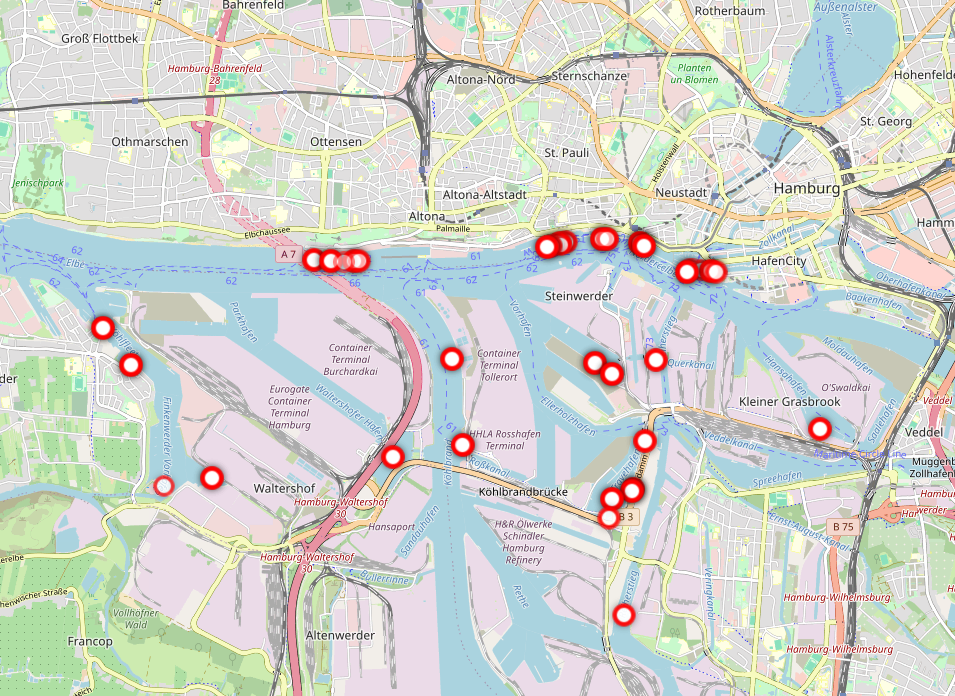
<p>In our workshop, we worked with an application for tracking vessel positions. This application tracks ships via AIS (Automatic Identification System), stores position data and vessel information, and displays current positions and history on a map.</p>
<figure id="fig:map-example">
<img src="https://asciijungle.com/images/map_example.png" />
<figcaption>Screenshot of the example application’s UI showing vessel positions in Hamburg harbor</figcaption>
</figure>
<p>In this application:</p>
<ul>
<li>The <strong>Domain</strong> contains the core business logic and entities such as Vessel, Position, and VesselHistory</li>
<li>The <strong>Ports</strong> define interfaces such as DataAccessPort, AisPort, and Database</li>
<li>The <strong>Adapters</strong> implement these interfaces to connect the domain with external systems, such as WebAppAdapter, MqttAdapter, and InMemoryDatabase</li>
</ul>
<p>This clear structure makes it easier for GenAI tools to understand and extend the application.</p>
<h3 id="practical-workflow-with-genai-tools">Practical Workflow with GenAI Tools</h3>
<p>During the workshop, we developed a practical workflow for working with GenAI tools in a hexagonal architecture.
First, create an implementation plan, then implement this plan step by step and Continuously test and refine the outcome.</p>
<h4 id="division-of-labor-between-developers-and-ai">Division of Labor Between Developers and AI</h4>
<p>You can take over yourself whenever you see fit. One strategy might be:</p>
<ol type="1">
<li>You as a developer define the domain and ports</li>
<li>AI implements business functions on the defined types</li>
<li>You define testcases and let the test code generate</li>
<li>AI creates adapter implementations</li>
</ol>
<p>That way you stay in control and there is at now point in time too much code generated so that it would be too much to review.</p>
<h4 id="test-driven-development">Test-Driven Development</h4>
<p>Hexagonal architecture nicely supports a test-driven approach. You can define test cases for the expected functionality in prosa text. Then you let the AI implement the code that fulfills these tests. Because of the Architecture you can always test implementations in isolation before integrating them into the overall system. You can mock your Ports for extensive coverage of your business logic. That way you’ll get a good confidence that the resulting system does what it should.
RooCode can run unit and architecture tests independently and thus correct errors directly from within the chat.</p>
<h3 id="conclusion">Conclusion</h3>
<p>In my eyes Hexagonal Architecture provides an ideal foundation for working with GenAI tools like rooCode:</p>
<ul>
<li><strong>Clear separation of concerns</strong> allows AI to understand and modify specific parts of the code without affecting others.</li>
<li><strong>Well-defined interfaces</strong> make it easier for AI to understand expected behavior and generate compatible code.</li>
<li><strong>Swappable implementations</strong> enable testing AI-generated code in isolation before it’s integrated.</li>
</ul>
<p>By applying this architecture, development teams can use GenAI tools more effectively to accelerate development, reduce errors, and improve code quality. The overhead of implementing abstraction layers is not such a burden when using GenAI tools. The clear boundaries and contracts provided by the architecture help AI generate correct and compatible code, while the isolation of components reduces the risk of AI-introduced errors affecting the entire system. Thus your code base becomes manageable even over lots of iterations.</p>
<p>I’d like to hear about your expeciences. Did you try something similar?</p>
    </section>
    <section class="author">
        <div class="image-container">
            <img src="https://asciijungle.com/images/author.jpg" alt="Portrait of the blog's author. Dude with full beard and short hair.">
        </div>
        <div class="about">
            <span><b>Author: Benjamin Brunzel</b></span>
            <span>I'm a software engineer based in Hamburg, Germany.</span>
            <span>If you want to get in touch <a href="https://norden.social/@asciijungle"> contact me in the fediverse</a></span>
        </div>
    </section>
    
</article>
]]></summary>
</entry>
<entry>
    <title>Debugging File Permissions in AWS ECS Tasks</title>
    <link href="https://asciijungle.com/posts/2025-05-06-debugging-file-permissions-in-aws-ecs.html" />
    <id>https://asciijungle.com/posts/2025-05-06-debugging-file-permissions-in-aws-ecs.html</id>
    <published>2025-05-06T00:00:00Z</published>
    <updated>2025-05-06T00:00:00Z</updated>
    <summary type="html"><![CDATA[<article>
    <header>
        <h1>Debugging File Permissions in AWS ECS Tasks</h1>
        <section class="date">
            Posted on 2025-05-06
            
        </section>
        <section class="tldr">
            <div>TL;DR</div>
            <span>How I solved file permission issues in AWS ECS tasks when running containers with unprivileged users, read-only root filesystems, and writable temporary directories.</span>
        </section>
    </header>
    <section>
        <p>When working with containerized applications in AWS ECS, you might encounter file permission issues, especially when implementing security best practices. Recently, I had to debug file permissions in an AWS ECS task with the following requirements:</p>
<ul>
<li>The process within the container must run as an unprivileged user</li>
<li>The root file system must be mounted as read-only</li>
<li>The process must be able to write to the /tmp directory</li>
<li>The contents of the /tmp directory should be cleared on container start</li>
<li>The container runs in AWS ECS with Fargate backend</li>
</ul>
<p>Me and the team tried multiple approaches. Involving EFS and S3 as volumes meant we had to implement the clearing the /tmp directory on container start. Defining and mounting an ephemeral storage volume caused trouble because it was mounted as the root user so it cannot be used by the unprivileged user.
Then I stumbled accross a solution that was posted in a subreddit<a href="#fn1" class="footnote-ref" id="fnref1" role="doc-noteref"><sup>1</sup></a>. They suggested to define a Docker volume in the Dockerfile and have ECS create an ephemeral storage mount automatically.</p>
<div class="sourceCode" id="cb1"><pre class="sourceCode dockerfile"><code class="sourceCode dockerfile"><span id="cb1-1"><a href="#cb1-1" aria-hidden="true" tabindex="-1"></a><span class="kw">VOLUME</span> /tmp</span></code></pre></div>
<p>In this post, I’ll share my debugging approach used to validate this solution. The debugging approach is not limited to the use of AWS ECS. It can be of value for all container environments such as kubernetes or plain docker.</p>
<h3 id="debugging-with-an-overriden-container-entrypoint">Debugging with an overriden Container Entrypoint</h3>
<p>When troubleshooting container permission issues, it’s helpful to use simple CLI tools to check the current user and directory permissions. I modified my container’s entry point in the ECS task definition to run a series of diagnostic commands:</p>
<div class="sourceCode" id="cb2"><pre class="sourceCode terraform"><code class="sourceCode terraform"><span id="cb2-1"><a href="#cb2-1" aria-hidden="true" tabindex="-1"></a><span class="kw">resource</span> <span class="st">&quot;aws_ecs_task_definition&quot;</span> <span class="st">&quot;my-task&quot;</span> {</span>
<span id="cb2-2"><a href="#cb2-2" aria-hidden="true" tabindex="-1"></a>  family                   <span class="op">=</span> <span class="st">&quot;service&quot;</span></span>
<span id="cb2-3"><a href="#cb2-3" aria-hidden="true" tabindex="-1"></a>  network_mode             <span class="op">=</span> <span class="st">&quot;awsvpc&quot;</span></span>
<span id="cb2-4"><a href="#cb2-4" aria-hidden="true" tabindex="-1"></a>  requires_compatibilities <span class="op">=</span> [<span class="st">&quot;FARGATE&quot;</span>]</span>
<span id="cb2-5"><a href="#cb2-5" aria-hidden="true" tabindex="-1"></a>  cpu                      <span class="op">=</span> <span class="st">&quot;256&quot;</span></span>
<span id="cb2-6"><a href="#cb2-6" aria-hidden="true" tabindex="-1"></a>  memory                   <span class="op">=</span> <span class="st">&quot;512&quot;</span></span>
<span id="cb2-7"><a href="#cb2-7" aria-hidden="true" tabindex="-1"></a></span>
<span id="cb2-8"><a href="#cb2-8" aria-hidden="true" tabindex="-1"></a>  execution_role_arn <span class="op">=</span> aws_iam_role.ecs<span class="op">-</span>task<span class="op">-</span>execution<span class="op">-</span>role.arn</span>
<span id="cb2-9"><a href="#cb2-9" aria-hidden="true" tabindex="-1"></a>  task_role_arn <span class="op">=</span> aws_iam_role.ecs<span class="op">-</span>task<span class="op">-</span>execution<span class="op">-</span>role.arn</span>
<span id="cb2-10"><a href="#cb2-10" aria-hidden="true" tabindex="-1"></a></span>
<span id="cb2-11"><a href="#cb2-11" aria-hidden="true" tabindex="-1"></a>  container_definitions <span class="op">=</span> <span class="bu">jsonencode</span>([</span>
<span id="cb2-12"><a href="#cb2-12" aria-hidden="true" tabindex="-1"></a>    {</span>
<span id="cb2-13"><a href="#cb2-13" aria-hidden="true" tabindex="-1"></a>      name                     <span class="op">=</span> <span class="st">&quot;my-service&quot;</span></span>
<span id="cb2-14"><a href="#cb2-14" aria-hidden="true" tabindex="-1"></a>      image                    <span class="op">=</span> <span class="va">local</span>.image_uri</span>
<span id="cb2-15"><a href="#cb2-15" aria-hidden="true" tabindex="-1"></a>      cpu                      <span class="op">=</span> <span class="dv">256</span></span>
<span id="cb2-16"><a href="#cb2-16" aria-hidden="true" tabindex="-1"></a>      memory                   <span class="op">=</span> <span class="dv">512</span></span>
<span id="cb2-17"><a href="#cb2-17" aria-hidden="true" tabindex="-1"></a>      essential                <span class="op">=</span> <span class="va">true</span></span>
<span id="cb2-18"><a href="#cb2-18" aria-hidden="true" tabindex="-1"></a>      readonlyRootFilesystem   <span class="op">=</span> <span class="va">true</span></span>
<span id="cb2-19"><a href="#cb2-19" aria-hidden="true" tabindex="-1"></a>      user                     <span class="op">=</span> <span class="st">&quot;185&quot;</span></span>
<span id="cb2-20"><a href="#cb2-20" aria-hidden="true" tabindex="-1"></a>      portMappings <span class="op">=</span> [</span>
<span id="cb2-21"><a href="#cb2-21" aria-hidden="true" tabindex="-1"></a>        {</span>
<span id="cb2-22"><a href="#cb2-22" aria-hidden="true" tabindex="-1"></a>          containerPort <span class="op">=</span> <span class="dv">9090</span></span>
<span id="cb2-23"><a href="#cb2-23" aria-hidden="true" tabindex="-1"></a>          hostPort      <span class="op">=</span> <span class="dv">9090</span></span>
<span id="cb2-24"><a href="#cb2-24" aria-hidden="true" tabindex="-1"></a>        }</span>
<span id="cb2-25"><a href="#cb2-25" aria-hidden="true" tabindex="-1"></a>      ]</span>
<span id="cb2-26"><a href="#cb2-26" aria-hidden="true" tabindex="-1"></a>      entryPoint <span class="op">=</span> [</span>
<span id="cb2-27"><a href="#cb2-27" aria-hidden="true" tabindex="-1"></a>        <span class="st">&quot;sh&quot;</span>,</span>
<span id="cb2-28"><a href="#cb2-28" aria-hidden="true" tabindex="-1"></a>        <span class="st">&quot;-c&quot;</span></span>
<span id="cb2-29"><a href="#cb2-29" aria-hidden="true" tabindex="-1"></a>      ]</span>
<span id="cb2-30"><a href="#cb2-30" aria-hidden="true" tabindex="-1"></a>      command <span class="op">=</span> [</span>
<span id="cb2-31"><a href="#cb2-31" aria-hidden="true" tabindex="-1"></a>         <span class="st">&quot;set -x; whoami; ls -la /tmp; touch /tmp/itWorks; ls -la /tmp; cat /proc/mounts; df -h&quot;</span></span>
<span id="cb2-32"><a href="#cb2-32" aria-hidden="true" tabindex="-1"></a>      ]</span>
<span id="cb2-33"><a href="#cb2-33" aria-hidden="true" tabindex="-1"></a>    }</span>
<span id="cb2-34"><a href="#cb2-34" aria-hidden="true" tabindex="-1"></a>  ])</span>
<span id="cb2-35"><a href="#cb2-35" aria-hidden="true" tabindex="-1"></a>}</span>
<span id="cb2-36"><a href="#cb2-36" aria-hidden="true" tabindex="-1"></a></span></code></pre></div>
<p>Let’s break down these commands and understand what each one does:</p>
<h4 id="command-chaining-with-semicolons">Command Chaining with Semicolons</h4>
<p>In the shell, the semicolon `;` allows you to run multiple commands sequentially on a single line. Each command runs independently, regardless of whether the previous command succeeded or failed. This is different from using `&amp;&amp;` which only runs the next command if the previous command succeeded, or `||` which only runs the next command if the previous one failed. In this case failing means returning a non zero returncode.</p>
<h4 id="set--x">set -x</h4>
<p>The `set -x` command enables debug mode in the shell. When this mode is active, the shell prints each command before executing it, prefixed with a + sign. This is useful for debugging scripts as it shows what commands are being executed. Without this it can be difficult to see which command yielded which output.</p>
<h4 id="whoami">whoami</h4>
<p>The `whoami` command prints the current user’s username. In our case, it showed that the container was running as the “jboss” user, confirming that we were indeed running as an unprivileged user defined in the Dockerfile of the base image.</p>
<h4 id="ls--la-tmp">ls -la /tmp</h4>
<p>The `ls -la` command lists all files in a directory showing permissions, ownership, size, and modification time. This helped me see the current state of the /tmp directory and its permissions.</p>
<h4 id="touch-tmpitworks">touch /tmp/itWorks</h4>
<p>The `touch` command creates an empty file. I used it to test if the current user had write permissions in the /tmp directory. If this command succeeds, it confirms that the current user can write to the specified location.</p>
<h4 id="cat-procmounts">cat /proc/mounts</h4>
<p>The `cat /proc/mounts` command displays all mounted filesystems in the container. This is useful for seeing how filesystems are mounted. In this case, it showed that the root filesystem was indeed mounted as read-only (ro), while /tmp had its own mount point.</p>
<h4 id="df--h">df -h</h4>
<p>The `df -h` command shows disk space usage. This helped confirm which filesystems were available and how much space was allocated to them.</p>
<h3 id="analyzing-the-output">Analyzing the Output</h3>
<p>Let’s run the container and have a look at the output of these commands:</p>
<div class="sourceCode" id="cb3"><pre class="sourceCode bash"><code class="sourceCode bash"><span id="cb3-1"><a href="#cb3-1" aria-hidden="true" tabindex="-1"></a><span class="ex">+</span> whoami</span>
<span id="cb3-2"><a href="#cb3-2" aria-hidden="true" tabindex="-1"></a><span class="ex">jboss</span></span>
<span id="cb3-3"><a href="#cb3-3" aria-hidden="true" tabindex="-1"></a><span class="ex">+</span> ls <span class="at">-la</span> /tmp</span>
<span id="cb3-4"><a href="#cb3-4" aria-hidden="true" tabindex="-1"></a><span class="ex">total</span> 16</span>
<span id="cb3-5"><a href="#cb3-5" aria-hidden="true" tabindex="-1"></a><span class="ex">drwxrwxrwt</span> 2 root root 4096 Apr 24 11:55 .</span>
<span id="cb3-6"><a href="#cb3-6" aria-hidden="true" tabindex="-1"></a><span class="ex">drwxr-xr-x</span> 1 root root 4096 Apr 24 11:55 ..</span>
<span id="cb3-7"><a href="#cb3-7" aria-hidden="true" tabindex="-1"></a><span class="ex">-rwx------</span> 1 root root 291 Mar 13 11:05 ks-script-fb_e6y2x</span>
<span id="cb3-8"><a href="#cb3-8" aria-hidden="true" tabindex="-1"></a><span class="ex">-rwx------</span> 1 root root 701 Mar 13 11:05 ks-script-s7hte0c5</span>
<span id="cb3-9"><a href="#cb3-9" aria-hidden="true" tabindex="-1"></a><span class="ex">+</span> touch /tmp/itWorks</span>
<span id="cb3-10"><a href="#cb3-10" aria-hidden="true" tabindex="-1"></a><span class="ex">+</span> ls <span class="at">-la</span> /tmp</span>
<span id="cb3-11"><a href="#cb3-11" aria-hidden="true" tabindex="-1"></a><span class="ex">total</span> 16</span>
<span id="cb3-12"><a href="#cb3-12" aria-hidden="true" tabindex="-1"></a><span class="ex">drwxrwxrwt</span> 2 root root 4096 Apr 24 11:55 .</span>
<span id="cb3-13"><a href="#cb3-13" aria-hidden="true" tabindex="-1"></a><span class="ex">drwxr-xr-x</span> 1 root root 4096 Apr 24 11:55 ..</span>
<span id="cb3-14"><a href="#cb3-14" aria-hidden="true" tabindex="-1"></a><span class="ex">-rw-r--r--</span> 1 jboss root 0 Apr 24 11:55 itWorks</span>
<span id="cb3-15"><a href="#cb3-15" aria-hidden="true" tabindex="-1"></a><span class="ex">-rwx------</span> 1 root root 291 Mar 13 11:05 ks-script-fb_e6y2x</span>
<span id="cb3-16"><a href="#cb3-16" aria-hidden="true" tabindex="-1"></a><span class="ex">-rwx------</span> 1 root root 701 Mar 13 11:05 ks-script-s7hte0c5</span></code></pre></div>
<p>From this output, I could see:</p>
<ol type="1">
<li>The container was running as the “jboss” user (unprivileged) otherwise it would have stated `root`</li>
<li>The /tmp directory belongs to root bu it has the sticky bit set (t in drwxrwxrwt), which allows any user to create files but only the owner can delete them. This is common for the /tmp directory.</li>
<li>The “jboss” user was able to successfully create a file in /tmp</li>
</ol>
<p>The mount information was particularly revealing:</p>
<div class="sourceCode" id="cb4"><pre class="sourceCode bash"><code class="sourceCode bash"><span id="cb4-1"><a href="#cb4-1" aria-hidden="true" tabindex="-1"></a><span class="ex">+</span> cat /proc/mounts</span>
<span id="cb4-2"><a href="#cb4-2" aria-hidden="true" tabindex="-1"></a><span class="ex">overlay</span> / </span>
<span id="cb4-3"><a href="#cb4-3" aria-hidden="true" tabindex="-1"></a><span class="ex">overlay</span> ro,relatime,lowerdir=/var/lib/containerd/io.containerd.snapshotter.v1.overlayfs/snapshots/103/fs:/var/lib/containerd/io.containerd.snapshotter.v1.overlayfs/snapshots/102/fs:/var/lib/containerd/io.containerd.snapshotter.v1.overlayfs/snapshots/101/fs:/var/lib/containerd/io.containerd.snapshotter.v1.overlayfs/snapshots/100/fs:/var/lib/containerd/io.containerd.snapshotter.v1.overlayfs/snapshots/99/fs:/var/lib/containerd/io.containerd.snapshotter.v1.overlayfs/snapshots/93/fs,upperdir=/var/lib/containerd/io.containerd.snapshotter.v1.overlayfs/snapshots/107/fs,workdir=/var/lib/containerd/io.containerd.snapshotter.v1.overlayfs/snapshots/107/work 0 0</span>
<span id="cb4-4"><a href="#cb4-4" aria-hidden="true" tabindex="-1"></a><span class="ex">/dev/nvme1n1</span> /tmp ext4 rw,relatime 0 0</span></code></pre></div>
<p>This showed that:</p>
<ol type="1">
<li>The root filesystem (/) was mounted as read-only (ro)</li>
<li>The /tmp directory was mounted as a separate filesystem with read-write permissions (rw)</li>
</ol>
<p>The disk usage information confirmed this setup:</p>
<div class="sourceCode" id="cb5"><pre class="sourceCode bash"><code class="sourceCode bash"><span id="cb5-1"><a href="#cb5-1" aria-hidden="true" tabindex="-1"></a><span class="ex">+</span> df <span class="at">-h</span></span>
<span id="cb5-2"><a href="#cb5-2" aria-hidden="true" tabindex="-1"></a><span class="ex">Filesystem</span> Size Used Avail Use% Mounted on</span>
<span id="cb5-3"><a href="#cb5-3" aria-hidden="true" tabindex="-1"></a><span class="ex">overlay</span> 30G 11G 18G 37% /</span>
<span id="cb5-4"><a href="#cb5-4" aria-hidden="true" tabindex="-1"></a><span class="ex">tmpfs</span> 64M 0 64M 0% /dev</span>
<span id="cb5-5"><a href="#cb5-5" aria-hidden="true" tabindex="-1"></a><span class="ex">shm</span> 464M 0 464M 0% /dev/shm</span>
<span id="cb5-6"><a href="#cb5-6" aria-hidden="true" tabindex="-1"></a><span class="ex">tmpfs</span> 464M 0 464M 0% /sys/fs/cgroup</span>
<span id="cb5-7"><a href="#cb5-7" aria-hidden="true" tabindex="-1"></a><span class="ex">/dev/nvme1n1</span> 30G 11G 18G 37% /tmp</span>
<span id="cb5-8"><a href="#cb5-8" aria-hidden="true" tabindex="-1"></a><span class="ex">tmpfs</span> 464M 0 464M 0% /proc/acpi</span></code></pre></div>
<p>So in the end the definition of a docker volume for /tmp did the trick.
When you define a volume in your Dockerfile, ECS with Fargate automatically creates an ephemeral storage mount with the correct permissions for the user specified in your container. This eliminates the need for manual permission adjustments.
The storage used is AWS’s ephemeral storage, meaning it is temporary and will be removed when the container stops. This is ideal for temporary data storage needs.</p>
<h4 id="additional-considerations">Additional Considerations</h4>
<p>ECS on Fargate automatically handles permissions for volumes. It will create the montpoint folder owned by the user that is specified in your container (e.g., user 185 or jboss).
You can define multiple volumes if your application needs to write to different directories. If you need persistent storage instead of ephemeral, you would need to use EFS or other persistent storage options with ECS. This solution will not work for you in that case.
I have not found any resource documenting this, admittedly useful, implementation of ECS. I don’t know but this behaviour might change in the future. There is an open Github Issue with a discussion regarding this though<a href="#fn2" class="footnote-ref" id="fnref2" role="doc-noteref"><sup>2</sup></a>.</p>
<h3 id="conclusion">Conclusion</h3>
<p>Debugging file permissions in containerized environments can be challenging, but using simple CLI tools can provide valuable insights into what’s happening inside your container.
Hope that helps you out.</p>
<h3 id="footnotes">Footnotes</h3>
<section id="footnotes" class="footnotes footnotes-end-of-document" role="doc-endnotes">
<hr />
<ol>
<li id="fn1"><p><a href="https://www.reddit.com/r/aws/comments/1f4oiyn/comment/lkow7yu/?utm_source=share&amp;utm_medium=web3x&amp;utm_name=web3xcss&amp;utm_term=1&amp;utm_content=share_button">Reddit Discussion on ECS and Fargate Volume Permissions</a><a href="#fnref1" class="footnote-back" role="doc-backlink">↩︎</a></p></li>
<li id="fn2"><p><a href="https://github.com/aws/containers-roadmap/issues/938">AWS Containers Roadmap GitHub Issue</a><a href="#fnref2" class="footnote-back" role="doc-backlink">↩︎</a></p></li>
</ol>
</section>
    </section>
    <section class="author">
        <div class="image-container">
            <img src="https://asciijungle.com/images/author.jpg" alt="Portrait of the blog's author. Dude with full beard and short hair.">
        </div>
        <div class="about">
            <span><b>Author: Benjamin Brunzel</b></span>
            <span>I'm a software engineer based in Hamburg, Germany.</span>
            <span>If you want to get in touch <a href="https://norden.social/@asciijungle"> contact me in the fediverse</a></span>
        </div>
    </section>
    
</article>
]]></summary>
</entry>
<entry>
    <title>Configuring Git Commit Signing for Multiple Environments</title>
    <link href="https://asciijungle.com/posts/2025-04-24-git-commit-signing-for-multiple-environments.html" />
    <id>https://asciijungle.com/posts/2025-04-24-git-commit-signing-for-multiple-environments.html</id>
    <published>2025-04-24T00:00:00Z</published>
    <updated>2025-04-24T00:00:00Z</updated>
    <summary type="html"><![CDATA[<article>
    <header>
        <h1>Configuring Git Commit Signing for Multiple Environments</h1>
        <section class="date">
            Posted on 2025-04-24
            
        </section>
        <section class="tldr">
            <div>TL;DR</div>
            <span>Learn how to configure Git commit signing for multiple environments, using the includeIf directive to apply different emails and signing keys for specific repositories, enhancing organization, security, and productivity.</span>
        </section>
    </header>
    <section>
        <p>I have to manage multiple git repositories hosted on different servers. Each project might require specific configurations, especially when it comes to commit signing with Git. This blog post will guide you through setting up different SSH identities and email addresses for commit signing in various Git repositories, all while maintaining a clean and organized configuration.</p>
<p>First, let’s establish a global configuration in your ~/.gitconfig file. This will serve as the default for repositories that don’t require specific settings. Here’s an example configuration:</p>
<div class="sourceCode" id="cb1"><pre class="sourceCode ini"><code class="sourceCode ini"><span id="cb1-1"><a href="#cb1-1" aria-hidden="true" tabindex="-1"></a><span class="co"># core </span><span class="re">{{{</span></span>
<span id="cb1-2"><a href="#cb1-2" aria-hidden="true" tabindex="-1"></a><span class="kw">[core]</span></span>
<span id="cb1-3"><a href="#cb1-3" aria-hidden="true" tabindex="-1"></a><span class="dt">    editor </span><span class="ot">=</span><span class="st"> /usr/bin/vim</span></span>
<span id="cb1-4"><a href="#cb1-4" aria-hidden="true" tabindex="-1"></a><span class="dt">    excludesfile </span><span class="ot">=</span><span class="st"> ~/.gitignore_global</span></span>
<span id="cb1-5"><a href="#cb1-5" aria-hidden="true" tabindex="-1"></a><span class="dt">    pager</span><span class="ot">=</span><span class="st">less</span></span>
<span id="cb1-6"><a href="#cb1-6" aria-hidden="true" tabindex="-1"></a><span class="co">#</span><span class="re">}}}</span></span>
<span id="cb1-7"><a href="#cb1-7" aria-hidden="true" tabindex="-1"></a></span>
<span id="cb1-8"><a href="#cb1-8" aria-hidden="true" tabindex="-1"></a><span class="co"># user </span><span class="re">{{{</span></span>
<span id="cb1-9"><a href="#cb1-9" aria-hidden="true" tabindex="-1"></a><span class="kw">[user]</span></span>
<span id="cb1-10"><a href="#cb1-10" aria-hidden="true" tabindex="-1"></a><span class="dt">    email </span><span class="ot">=</span><span class="st"> benjamin.brunzel@my-company.com</span></span>
<span id="cb1-11"><a href="#cb1-11" aria-hidden="true" tabindex="-1"></a><span class="dt">    name </span><span class="ot">=</span><span class="st"> Benjamin Brunzel</span></span>
<span id="cb1-12"><a href="#cb1-12" aria-hidden="true" tabindex="-1"></a><span class="co">#</span><span class="re">}}}</span></span></code></pre></div>
<p>This configuration sets your default email and name for commits, along with some core settings like your preferred editor and global ignore file.</p>
<p>For repositories under ~/dev/customer1, you might want to use a different email and signing key. Git allows you to include specific configurations based on the directory structure. Here’s how you can set it up:</p>
<p>In your global ~/.gitconfig, add an includeIf directive:</p>
<div class="sourceCode" id="cb2"><pre class="sourceCode ini"><code class="sourceCode ini"><span id="cb2-1"><a href="#cb2-1" aria-hidden="true" tabindex="-1"></a><span class="co"># includes for customer1</span></span>
<span id="cb2-2"><a href="#cb2-2" aria-hidden="true" tabindex="-1"></a><span class="kw">[includeIf &quot;gitdir:~/dev/customer1/**&quot;]</span></span>
<span id="cb2-3"><a href="#cb2-3" aria-hidden="true" tabindex="-1"></a><span class="dt">    path </span><span class="ot">=</span><span class="st"> ~/dev/customer1/customer1.gitconfig</span></span></code></pre></div>
<p>This tells Git to include the configuration from ~/dev/customer1/customer1.gitconfig for any repository within the ~/dev/customer1 directory.</p>
<p>Create a customer1.gitconfig file in the ~/dev/customer1 directory with the following content:</p>
<div class="sourceCode" id="cb3"><pre class="sourceCode ini"><code class="sourceCode ini"><span id="cb3-1"><a href="#cb3-1" aria-hidden="true" tabindex="-1"></a><span class="kw">[user]</span></span>
<span id="cb3-2"><a href="#cb3-2" aria-hidden="true" tabindex="-1"></a><span class="dt">    email </span><span class="ot">=</span><span class="st"> benjamin.brunzel@customer1.com</span></span>
<span id="cb3-3"><a href="#cb3-3" aria-hidden="true" tabindex="-1"></a><span class="dt">    name </span><span class="ot">=</span><span class="st"> Benjamin Brunzel</span></span>
<span id="cb3-4"><a href="#cb3-4" aria-hidden="true" tabindex="-1"></a><span class="dt">    signingkey </span><span class="ot">=</span><span class="st"> ~/.ssh/customer1_id_ed25519.pub</span></span>
<span id="cb3-5"><a href="#cb3-5" aria-hidden="true" tabindex="-1"></a></span>
<span id="cb3-6"><a href="#cb3-6" aria-hidden="true" tabindex="-1"></a><span class="kw">[core]</span></span>
<span id="cb3-7"><a href="#cb3-7" aria-hidden="true" tabindex="-1"></a><span class="dt">    sshCommand </span><span class="ot">=</span><span class="st"> &quot;ssh -i ~/.ssh/customer1_id_ed25519&quot;</span></span>
<span id="cb3-8"><a href="#cb3-8" aria-hidden="true" tabindex="-1"></a></span>
<span id="cb3-9"><a href="#cb3-9" aria-hidden="true" tabindex="-1"></a><span class="kw">[gpg]</span></span>
<span id="cb3-10"><a href="#cb3-10" aria-hidden="true" tabindex="-1"></a><span class="dt">    format </span><span class="ot">=</span><span class="st"> ssh</span></span>
<span id="cb3-11"><a href="#cb3-11" aria-hidden="true" tabindex="-1"></a></span>
<span id="cb3-12"><a href="#cb3-12" aria-hidden="true" tabindex="-1"></a><span class="kw">[commit]</span></span>
<span id="cb3-13"><a href="#cb3-13" aria-hidden="true" tabindex="-1"></a><span class="dt">    gpgsign </span><span class="ot">=</span><span class="st"> </span><span class="kw">true</span></span></code></pre></div>
<p>This configuration specifies a different email and signing key for commits made in repositories under ~/dev/customer1. The gpgsign option ensures that all commits are signed using the specified SSH key.</p>
<p>Note that by setting the `sshCommand` like specified above you are able to select different keys for different git accounts based on the directory the checked out repositories reside in. Very important here is that the ssh agent uses connection multiplexing. That means ssh will not create a new session to the same server as long as it still maintains one. If you want to switch accounts bewteen the same server you will have to terminate an existing session. If you need it this can be done with</p>
<div class="sourceCode" id="cb4" data-org-language="sh"><pre class="sourceCode bash"><code class="sourceCode bash"><span id="cb4-1"><a href="#cb4-1" aria-hidden="true" tabindex="-1"></a><span class="fu">ssh</span> <span class="at">-O</span> exit git@your-git-server.com</span></code></pre></div>
<p>By structuring your configurations based on directory paths, you maintain a clean and organized setup that automatically applies the correct settings based on the repository location. Using different SSH keys for different environments enhances security by compartmentalizing access. Easily switch between different configurations without manually changing settings each time you work on a different project.</p>
<p>Configuring Git to use different identities and email addresses for commit signing across multiple environments is a powerful way to manage your projects efficiently. By leveraging Git’s includeIf directive, you can ensure that each repository uses the correct settings, enhancing both security and productivity. I hope that helps you out.</p>
    </section>
    <section class="author">
        <div class="image-container">
            <img src="https://asciijungle.com/images/author.jpg" alt="Portrait of the blog's author. Dude with full beard and short hair.">
        </div>
        <div class="about">
            <span><b>Author: Benjamin Brunzel</b></span>
            <span>I'm a software engineer based in Hamburg, Germany.</span>
            <span>If you want to get in touch <a href="https://norden.social/@asciijungle"> contact me in the fediverse</a></span>
        </div>
    </section>
    
</article>
]]></summary>
</entry>
<entry>
    <title>The use of an Amateur Radio License in the Era of modern Telecommunication</title>
    <link href="https://asciijungle.com/posts/2023-11-16-amateur-radio-license-in-2023.html" />
    <id>https://asciijungle.com/posts/2023-11-16-amateur-radio-license-in-2023.html</id>
    <published>2023-11-16T00:00:00Z</published>
    <updated>2023-11-16T00:00:00Z</updated>
    <summary type="html"><![CDATA[<article>
    <header>
        <h1>The use of an Amateur Radio License in the Era of modern Telecommunication</h1>
        <section class="date">
            Posted on 2023-11-16
            
        </section>
        <section class="tldr">
            <div>TL;DR</div>
            <span>I passed my amateur radio examination in the summer. Even though we live in an globally connected world its still amazing to be able to get in contact with people around the world only using local equipment.</span>
        </section>
    </header>
    <section>
        <p>I lately got into ham radio. Working on a side project which receives ship’s AIS Signals<a href="#fn1" class="footnote-ref" id="fnref1" role="doc-noteref"><sup>1</sup></a>, I wanted to build an antenna for receiving them well. I read up on the internet and got a reccomendatin to meet up with the local ham radio folks that are building all sorts of antennas. Being curious about it I attended one of their community meetings at E13 in Bramfeld which is within cycling distance.
They gave me some recommendations and said that, if I was interested in how antennas work, I should join their ham radio classes which had just started. I would go there once a week and learn all the basics that would be tested during the exam for the general license.</p>
<p>I have to say ham radio is quite a world of it’s own. A rabbit hole that is quite fun to go down. Especially since I enjoy learning about the history of communication technology and computer science. There is quite some overlap of these topics. For example morse code being the predecessor of radio teletype<a href="#fn2" class="footnote-ref" id="fnref2" role="doc-noteref"><sup>2</sup></a> which was used as the basis for the tty shell interfaces of the first computers. And rtty and morse code based radio telegraphy<a href="#fn3" class="footnote-ref" id="fnref3" role="doc-noteref"><sup>3</sup></a> are still being used to this day by amateur radio operators!</p>
<p>But why would one care to learn all these things that are not used by the public anymore since we’ve developed far more advanced ways of communicating in the recent decades? First of all it’s fun to operate your own amateur radio station. There are quite some techniques to master in order to be able to have radio contacts with people hundreds or thousands of kilometers away. It just feels pleasant.</p>
<p>Then I think it is cool to keep the history of radio communication alive by talking to other tinkerers using old equipment. Ham radio operators are also allowed to build their own equipment. Antennas of cause but also transmitters and receivers which can also be a lot of fun. It’s a wide area of activity so there is a place for anybody.</p>
<p>So in the end I passed the exam and now am the proud owner of the international call-sign <a href="https://www.qrz.com/db/DL2XU">DL2XU</a>.</p>
<p>If your interested I’d like to hear what you think.</p>
<h2 id="footnotes">Footnotes</h2>
<section id="footnotes" class="footnotes footnotes-end-of-document" role="doc-endnotes">
<hr />
<ol>
<li id="fn1"><p>AIS stands for <a href="https://de.wikipedia.org/wiki/Automatic_Identification_System">Automatic Identification System</a>, a standard which has to be implemented by all maritime vessels of a certain size.<a href="#fnref1" class="footnote-back" role="doc-backlink">↩︎</a></p></li>
<li id="fn2"><p><a href="https://en.wikipedia.org/wiki/Radioteletype">https://en.wikipedia.org/wiki/Radioteletype</a><a href="#fnref2" class="footnote-back" role="doc-backlink">↩︎</a></p></li>
<li id="fn3"><p><a href="https://en.wikipedia.org/wiki/Continuous_wave">https://en.wikipedia.org/wiki/Continuous_wave</a><a href="#fnref3" class="footnote-back" role="doc-backlink">↩︎</a></p></li>
</ol>
</section>
    </section>
    <section class="author">
        <div class="image-container">
            <img src="https://asciijungle.com/images/author.jpg" alt="Portrait of the blog's author. Dude with full beard and short hair.">
        </div>
        <div class="about">
            <span><b>Author: Benjamin Brunzel</b></span>
            <span>I'm a software engineer based in Hamburg, Germany.</span>
            <span>If you want to get in touch <a href="https://norden.social/@asciijungle"> contact me in the fediverse</a></span>
        </div>
    </section>
    
</article>
]]></summary>
</entry>
<entry>
    <title>Book Review of The Age of Uncertainty, How Physics Changed the Way We See the World (1895 - 1945)</title>
    <link href="https://asciijungle.com/posts/2022-02-03-book-review-the-age-of-uncertainty.html" />
    <id>https://asciijungle.com/posts/2022-02-03-book-review-the-age-of-uncertainty.html</id>
    <published>2022-02-03T00:00:00Z</published>
    <updated>2022-02-03T00:00:00Z</updated>
    <summary type="html"><![CDATA[<article>
    <header>
        <h1>Book Review of The Age of Uncertainty, How Physics Changed the Way We See the World (1895 - 1945)</h1>
        <section class="date">
            Posted on 2022-02-03
            
        </section>
        <section class="tldr">
            <div>TL;DR</div>
            <span>Thoughts on a book describing the evolution of humanities imagination of the smallest building blocks of our universe. Painting a vivid picture of the characters competing to find the rules that make up our world and struggling to imagine what they mean.</span>
        </section>
    </header>
    <section>
        <p>The book by Tobias Hürter takes the reader back into a past that is both, long gone and strangely familiar. It introduces the physicians with their personalities and embeds them into a setting around the most famous universities of Europe at the time. Their relationships, families, friendships and disagreements bring them to life.</p>
<p>The rise and fall of the atomic and quantum physicians within their scientific community is astonishing to learn about. The book does not fail to describe the complex ideas behind modern quantum physics with their often times philosophical implications without overburdening with details and formulas.</p>
<p>It targets non physicians with a curiosity about the history of physics and particularly the circumstances in which the theories evolved. For me it was fascinating to learn about the interaction and close collaboration between scientists in a Europe that will soon be struck by two world wars. It hurt to see how open exchange of ideas and the freedom of speech was shut down by growing nationalism, racism and a society deluded by war.</p>
<p>After a sudden end the book leaves the reader curious about the advancement of quantum physics after the year 1945. I still enjoyed the book and can recommend it if this sounds compelling to you. I read the book in the german original (<a href="https://www.klett-cotta.de/buch/Leben/Das_Zeitalter_der_Unschaerfe/144073">Das Zeitalter der Unschärfe</a>). At the time of writing there is no english translation available yet.</p>
    </section>
    <section class="author">
        <div class="image-container">
            <img src="https://asciijungle.com/images/author.jpg" alt="Portrait of the blog's author. Dude with full beard and short hair.">
        </div>
        <div class="about">
            <span><b>Author: Benjamin Brunzel</b></span>
            <span>I'm a software engineer based in Hamburg, Germany.</span>
            <span>If you want to get in touch <a href="https://norden.social/@asciijungle"> contact me in the fediverse</a></span>
        </div>
    </section>
    
</article>
]]></summary>
</entry>
<entry>
    <title>Involving the Team in a Brand Relaunch.</title>
    <link href="https://asciijungle.com/posts/2020-06-10-redesign-ci-involving-the-organization.html" />
    <id>https://asciijungle.com/posts/2020-06-10-redesign-ci-involving-the-organization.html</id>
    <published>2020-06-10T00:00:00Z</published>
    <updated>2020-06-10T00:00:00Z</updated>
    <summary type="html"><![CDATA[<article>
    <header>
        <h1>Involving the Team in a Brand Relaunch.</h1>
        <section class="date">
            Posted on 2020-06-10
            
        </section>
        <section class="tldr">
            <div>TL;DR</div>
            <span>My company is working on a new brand design. They are improving the coworkers satisfaction with the result by involving a selected group in the design process.</span>
        </section>
    </header>
    <section>
        <p>The company I work for is currently working on a new corporate identity. But instead of puttering around on it behind closed doors they decided that they want to include the team in this process. And I quite agree with what they did.</p>
<p>When starting the work on the new design system they asked who of the personnel would want to be involved. Out of the people that expressed interest they selected 25 individuals that are representative for the whole company so that all age groups, jobs, genders and locations are covered.</p>
<p>These people where then presented with the ideas and the concept behind three different design “routes”. Each of the routes points towards a slightly different direction for the same brand. The Team was able to give feedback and express their impressions but also concerns.</p>
<p>When doing design work there is no “right way”. Just a lot of wrong ones. Not only does each coworker have a different taste in what they find visually pleasing, but also a different perception of what feelings they receive by looking at a particular design. In the process of coming up with a new corporate identity, a set of rules about how to communicate as a company via text and images, this limits the number of people being involved.</p>
<p>Yet it is desired to create something a majority of colleagues can agree and identify with. Involving them in the process greatly improves peoples connection to the new brand.</p>
<p>The feedback of the 25, if listened to, can help to fine tune a design. They will also help explaining the process and the decisions to the rest of the company.</p>
<p>I think it is great to involve the team in such kind of decisions. It is impossible to create a brand relaunch that everyone will totally agree with, but by knowing what is about to come and being able to provide feedback is a great way to improve the satisfaction with a new design. I think a similar approach is applicable to a lot of smaller scale design work as well.</p>
    </section>
    <section class="author">
        <div class="image-container">
            <img src="https://asciijungle.com/images/author.jpg" alt="Portrait of the blog's author. Dude with full beard and short hair.">
        </div>
        <div class="about">
            <span><b>Author: Benjamin Brunzel</b></span>
            <span>I'm a software engineer based in Hamburg, Germany.</span>
            <span>If you want to get in touch <a href="https://norden.social/@asciijungle"> contact me in the fediverse</a></span>
        </div>
    </section>
    
</article>
]]></summary>
</entry>
<entry>
    <title>I Backed MNT Reform, an Open Source Laptop</title>
    <link href="https://asciijungle.com/posts/2020-06-09-backed-mnt-reform.html" />
    <id>https://asciijungle.com/posts/2020-06-09-backed-mnt-reform.html</id>
    <published>2020-06-09T00:00:00Z</published>
    <updated>2020-06-09T00:00:00Z</updated>
    <summary type="html"><![CDATA[<article>
    <header>
        <h1>I Backed MNT Reform, an Open Source Laptop</h1>
        <section class="date">
            Posted on 2020-06-09
            
        </section>
        <section class="tldr">
            <div>TL;DR</div>
            <span>I support the MNT Reform crowdfunding campaign. A laptop where almost all aspects of the system are released under an open license. It is designed to be repairable and more secure by the lack of undocumented proprietary firmware.</span>
        </section>
    </header>
    <section>
        <p>As nowadays most computers suffer from security bugs <a href="#fn1" class="footnote-ref" id="fnref1" role="doc-noteref"><sup>1</sup></a>, glued together components, and undocumented, not upgradable hardware, its great to see people making an effort to provide an alternative. Instead of buying a new device every two to three years we need to repair and upgrade the devices we own. Now there is a laptop that claims to live up to these higher standards.</p>
<p>The MNT Research GmbH from Berlin, Germany started a new <a href="https://www.crowdsupply.com/mnt/reform">crowdfunding campaign</a> in May 2020. It features the second generation of their open hardware laptop MNT Reform. I already followed the projects updates on <a href="https://twitter.com/mntmn">twitter</a>. A laptop that is truly open, without intels infamous CPU bugs and without it’s shady <a href="https://en.wikipedia.org/wiki/Intel_Management_Engine">management engine</a> is something that I have to support. In addition to that it features a nice keyboard, passive cooling and even has a trackball! Of course I went for the DIY kit option and will have to assemble the whole machine myself.</p>
<p>The crowdfunding platform of their choice crowdsupply.com accepts payment methods other than credit card on <a href="https://www.crowdsupply.com/alternative-payment-request">request</a>.
The hardware is expected to ship as early as December 2020.</p>
<h2 id="footnotes">Footnotes</h2>
<section id="footnotes" class="footnotes footnotes-end-of-document" role="doc-endnotes">
<hr />
<ol>
<li id="fn1"><p><a href="https://securityboulevard.com/2020/03/new-intel-chipset-bug-utter-chaos-will-reign/">https://securityboulevard.com/2020/03/new-intel-chipset-bug-utter-chaos-will-reign/</a><a href="#fnref1" class="footnote-back" role="doc-backlink">↩︎</a></p></li>
</ol>
</section>
    </section>
    <section class="author">
        <div class="image-container">
            <img src="https://asciijungle.com/images/author.jpg" alt="Portrait of the blog's author. Dude with full beard and short hair.">
        </div>
        <div class="about">
            <span><b>Author: Benjamin Brunzel</b></span>
            <span>I'm a software engineer based in Hamburg, Germany.</span>
            <span>If you want to get in touch <a href="https://norden.social/@asciijungle"> contact me in the fediverse</a></span>
        </div>
    </section>
    
</article>
]]></summary>
</entry>

</feed>